

How to share a Claude project with anyone, and their AI
Fred Chang ·
So, I had an idea for a project and wanted my friend Sam's help. He uses Codex and I use Claude.
My Claude couldn't share the project with Sam, because we aren't in the same Claude Team org. But we are both connected to agentleFS, a folder online that any AI can read and write. So I asked my AI to start the project with Sam in a shared folder. It emailed Sam an invite. Now both our AIs read and write that same folder, and we work better together.
TLDR: sign up for agentleFS, ask your AI to make a shared folder, write the plan, and invite your friend.
agentleFS keeps every version of every file and folder. To roll back, log in to agentleFS.com and pick any version from the history. Or ask your AI or agent to do it.
How to collaborate on a project with anyone
- Connect your AI. Pick yours:
| AI | How to connect |
|---|---|
| Claude Code | Paste: Set up agentleFS for me by following https://agentlefs.com/connect.md |
| Claude (web, desktop, phone) | Settings → Connectors → Add custom connector: https://mcp.agentlefs.com/mcp |
| ChatGPT | Add a custom connector with https://mcp.agentlefs.com/mcp |
| Gemini CLI | gemini mcp add --transport http --scope user agentlefs https://mcp.agentlefs.com/mcp |
| Codex | codex mcp add agentlefs --url https://mcp.agentlefs.com/mcp |
| Grok Build | grok mcp add --transport http agentlefs https://mcp.agentlefs.com/mcp |
| Antigravity CLI | "serverUrl": "https://mcp.agentlefs.com/mcp" in ~/.gemini/config/mcp_config.json |
| Cursor | One-click install from the console's Connect screen |
On the blog: a dropdown that shows one AI's steps at a time, built from the same list as the console's Connect screen, so the two never disagree.
- Your AI can now read and write agentleFS. Its nickname is afs by default, so it's easy to type.
Start a shared folder in afs called launch with sam@example.com,
and write our draft vacation plan in it.
Can you share a project in ChatGPT, Gemini or Grok?
Partly. Each lab shares only inside its own app, and only its own AI reads what you share.
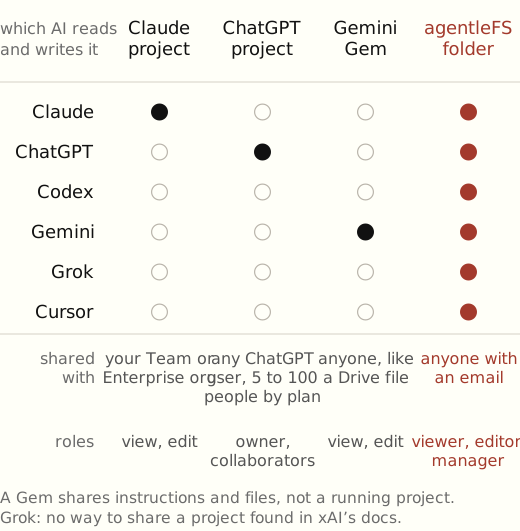
| Claude projects¹ | ChatGPT projects² | Gemini Gems³ | agentleFS folder | |
|---|---|---|---|---|
| Who you can share with | Your Team or Enterprise org | Any ChatGPT user (Free 5 people, Plus 10, Pro 100); Business only its workspace | Anyone, like a Drive file, unless a Workspace admin limits it | Anyone with an email |
| Roles | Can view, Can edit | Owner, collaborators | Can view, Can edit | Viewer, editor, manager |
| Which AI reads and writes it | Claude | ChatGPT | Gemini | Claude, ChatGPT, Codex, Gemini, Grok, Cursor |
Grok: we found no way to share a project in xAI's docs. A Gem shares instructions and files, not a running project.
Try it: sign up, connect your AI, and ask it to start a shared project.
Related