

How to use Claude skills in every AI, and share them with your team
Fred Chang ·
We turn anything we do twice into a skill: written instructions Claude follows when a task calls for them. The CLAUDE.md post ran on four of them.
Then a teammate opened Codex, OpenAI's coding AI, instead of Claude Code. None of our skills were there. They lived in ~/.claude/skills/ on my laptop and in one repo.
TLDR: put your skills in an agentleFS folder, an online folder every AI you connect can read. agentleFS tells each AI which skills apply, and the AI reads one when the task needs it. Share the folder, and your team's AIs get them too.
What is a Claude skill?
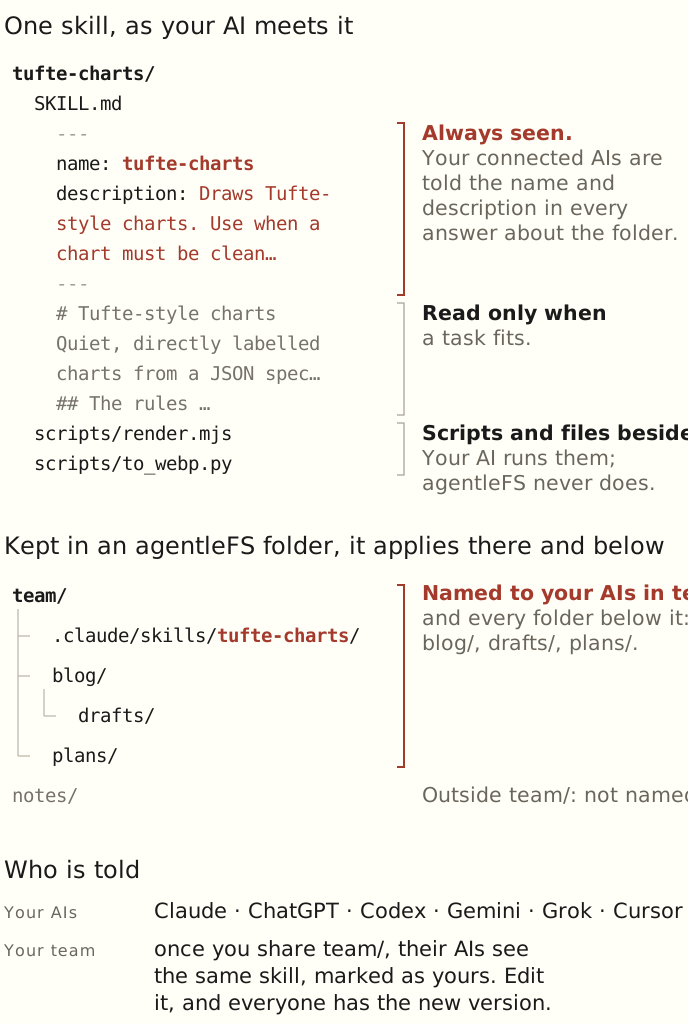
A folder with a SKILL.md file in it. The file holds a name, a description, then the instructions. Scripts or other files can sit beside it (Anthropic). Claude reads only the name and description until a task fits. Then it reads the rest. The format is an open standard, Agent Skills, so Codex reads the same file from .agents/skills/.
Where do Claude skills live?
On a disk. Claude Code reads ~/.claude/skills/ for you and .claude/skills/ in a repo for everyone who clones it. Codex reads .agents/skills/. A skill on your laptop never reaches your phone, the Claude app or a teammate who isn't in the repo.
How to use the same skills in every AI
- Sign up and connect your AIs. In Claude Code, paste: Set up agentleFS for me by following https://agentlefs.com/connect.md.
- Ask your Claude to copy its skills:
Copy my skills from ~/.claude/skills into agentleFS,
in a folder called team, under .claude/skills.
- agentleFS ends every answer about that folder with the skills that apply there. Your AIs read a skill's full instructions when the task fits, as Claude Code does on a disk.
- To have an AI load them every time it connects, open it on your Agents page and pick Load memory and skills for the folder.
- Share the folder with your team. Their AIs see the same skills, marked as yours. Edit one, and everyone has the new version.
Skills on a disk vs skills in agentleFS
~/.claude/skills or a repo | agentleFS folder | |
|---|---|---|
| Which AI reads it | The one on that computer | Claude, ChatGPT, Codex, Gemini, Grok, Cursor |
| Who gets it | You, or whoever clones the repo | Whoever you share the folder with |
| Updating | Copy it again, or merge a PR | Edit once; every AI reads the new version |
agentleFS never runs a skill. Your AI does, with its own permissions.
Where to find good Claude skills
Our public catalog lists skills from public GitHub repos. Our registry holds the ones we publish, such as github-file-history. Read a skill before your AI runs it. It's instructions, and sometimes scripts.
Try it: connect your Claude and ask it to copy one skill into agentleFS.
Related
Backed by: backend rows for skills applying in their folder and below, for a skill in a folder shared from another organization reaching the recipient, and for a skill you can't read never being named. To check: the exact console labels in step 4, and an end-to-end run of steps 2 and 3. Agent teams had too little search interest for its own section, so I left it out.