

Claude Code memory: keep your personal CLAUDE.md out of the repo
Fred Chang ·
My CLAUDE.md, the instructions file Claude Code reads at the start of every session, says how I like plans written, which words I never use and who to ask about billing. None of that belongs in our repo. My teammates shouldn't have to read it.
So it lived in ~/.claude/CLAUDE.md on my laptop. My cloud sessions didn't have it, my desktop didn't have it, and Codex never read it.
TLDR: keep your personal CLAUDE.md in your own folder in agentleFS, a store of documents your AI tools can read. Have every AI load it when it connects. The repo keeps only what the team shares.
Where does Claude Code store memory?
In CLAUDE.md files on disk (Anthropic):
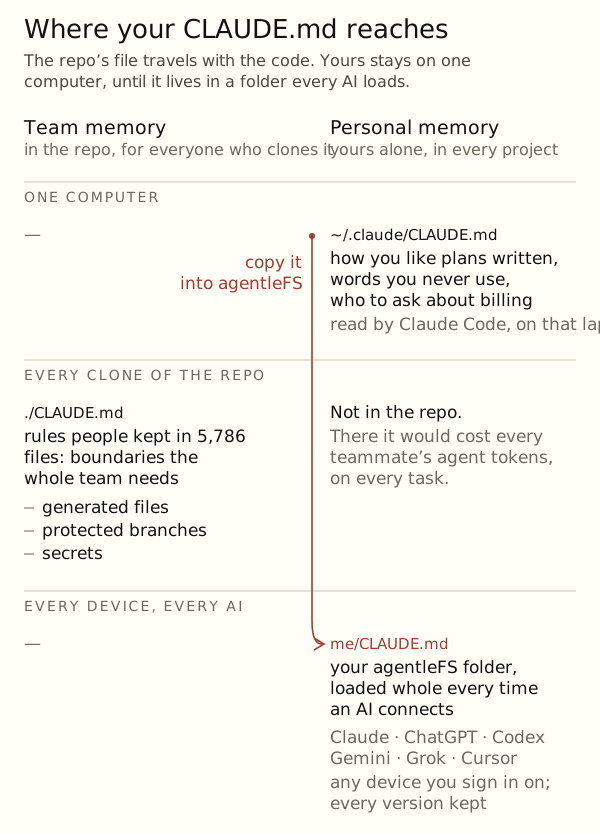
./CLAUDE.mdor./.claude/CLAUDE.mdin a repo, for everyone who clones it.~/.claude/CLAUDE.md, for you, in every project on that computer.
The repo file travels with the code. Yours stays on one computer.
Should your personal CLAUDE.md go in the repo?
No. In the 5,786 files I read for the CLAUDE.md post, the rules people kept were boundaries the whole team needs: generated files, protected branches, secrets. Your tone, your shortcuts and your notes on people are yours. In the repo, every teammate's agent reads them on every task, and that reading costs tokens.
How to give every AI your personal context
- Sign up. Your personal Organization holds folders only you can read.
- Connect your Claude. In Claude Code, paste: Set up agentleFS for me by following https://agentlefs.com/connect.md.
- Ask:
Copy ~/.claude/CLAUDE.md into agentleFS,
in a folder called me.
- On your Agents page, open each AI and pick Load memory and skills for
me. From then on, that AI gets the whole CLAUDE.md every time it connects. - Connect your other AIs. They load the same file, on any machine.
Personal CLAUDE.md on a laptop vs in agentleFS
~/.claude/CLAUDE.md | agentleFS me folder | |
|---|---|---|
| Where it works | That computer | Any device you sign in on |
| Which AI reads it | Claude Code | Claude, ChatGPT, Codex, Gemini, Grok, Cursor |
| In the repo | No | No |
| History | None, unless you track it | Every version kept |
What about memory tools like mem0?
They store facts a model pulls out of your chats. Your AI looks them up later. A CLAUDE.md is different: you write it, you read it, and every AI gets the same words. Ray wrote about when each fits in External agent memory across clients.
Try it: connect your Claude and ask it to copy your CLAUDE.md.
Related
Backed by: backend rows for what an agent loads at connect, and for a load being re-checked at every connect. To check: whether ChatGPT and Gemini show the loaded text in full (clients cut connect instructions to about 1,700 characters; brief_me carries the rest), and the console labels in step 4.