

ChatGPT to Claude, and back: switch AIs without losing your work
Fred Chang ·
Having an easy way to switch between frontier models would be great, and that requires a central place that all these models can access your data (Ya, and it is us, agentleFS).
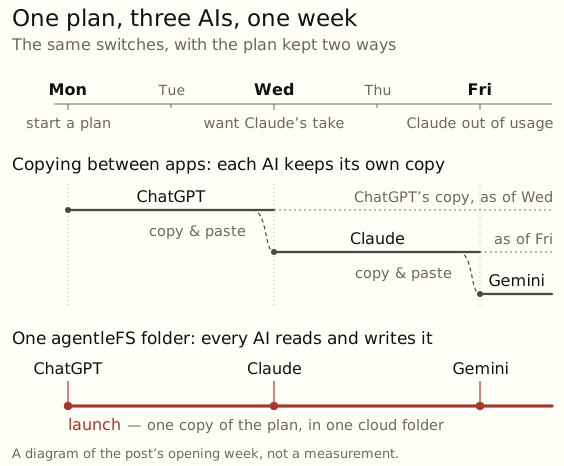
Each switch used to cost me a tedious round of copying and pasting. Now I keep these plans in one agentleFS folder online, and every AI I use reads the same files. The labs push new features constantly, so I can move to whichever AI I like.
TLDR: connect every AI you use to one agentleFS folder, and switching is delightfully easy.
How to switch AIs without losing your work
- Connect each AI you use. Pick yours:
| AI | How to connect |
|---|---|
| Claude Code | Paste: Set up agentleFS for me by following https://agentlefs.com/connect.md |
| Claude (web, desktop, phone) | Settings → Connectors → Add custom connector: https://mcp.agentlefs.com/mcp |
| ChatGPT | Add a custom connector with https://mcp.agentlefs.com/mcp |
| Gemini CLI | gemini mcp add --transport http --scope user agentlefs https://mcp.agentlefs.com/mcp |
| Codex | codex mcp add agentlefs --url https://mcp.agentlefs.com/mcp |
| Grok Build | grok mcp add --transport http agentlefs https://mcp.agentlefs.com/mcp |
| Antigravity CLI | "serverUrl": "https://mcp.agentlefs.com/mcp" in ~/.gemini/config/mcp_config.json |
| Cursor | One-click install from the console's Connect screen |
On the blog: the same dropdown as the share-a-project post.
- Ask your AI to save your work to a folder in agentleFS. For example: Save our plan and what we decided today to afs, in a folder called launch.
- Next time you connect another AI, ask it to read
launch. All your work is already there. For example: What is the latest in afs for the folder launch?
Your data now lives in a protected online filesystem (and damn, we take your privacy seriously!). Every AI you connect reads the same data, on your phone or your laptop, whichever lab made it.
And if you are super keen on keeping your data truly private, away from the grubby training hands of the frontier labs, connect your own open-source AI model. Then you are truly off the grid, so to speak. Private AI: keep your context yours covers how we keep it private, and how to run a local model on the same folder.
Related