

Replace Obsidian with a cloud second brain all your AIs and agents can read
Fred Chang ·
My Obsidian vault used to live on my laptop. I chat with my AI on several devices, so that was annoying. I built agentleFS as a Markdown-native home for notes. You and your agents can do Obsidian-like stuff there from anywhere.
TLDR: upload your vault, connect your AIs, and ask them to search, link and write your notes. Each note keeps its versions, and you can share one folder without the rest.
The easy way to build a cloud second brain with agentleFS
- Sign up, then Add → Upload and pick your vault folder. Its folders come with it.
- Connect your Claude. In Claude Code, paste: Set up agentleFS for me by following https://agentlefs.com/connect.md. In ChatGPT, Gemini and Grok, add
https://mcp.agentlefs.com/mcpas a connector. - Ask:
Search my notes for everything on pricing,
write a summary page that links to each note,
and add it to the index.
- Your Claude writes the page with
[[links]]. On save, agentleFS tells it which links found a note. So a typo doesn't leave a dead link. Each note lists what links to it. - Add the wiki skill, a saved set of instructions, to the folder. Every AI that opens the folder then keeps the index up to date.
Obsidian + MCP vs agentleFS
MCP is the standard way an AI connects to an outside tool. With an Obsidian MCP plugin, your AI reaches the vault only on the computer that holds it, or through a tunnel.
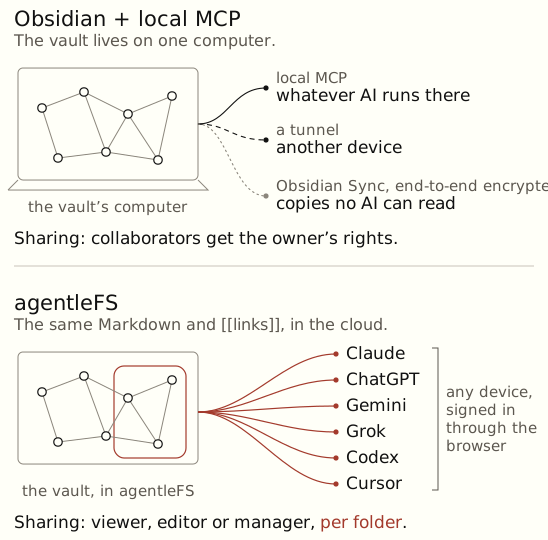
| Obsidian + local MCP | agentleFS | |
|---|---|---|
| Where your AI reaches it | The vault's computer, or a tunnel | Any device, signed in through the browser |
| Which AI | Whatever runs there | Claude, ChatGPT, Gemini, Grok, Codex, Cursor |
| Sharing | Collaborators get the owner's rights | Viewer, editor or manager, per folder |
You can keep Obsidian as your editor. The files stay Markdown, so nothing locks you in.
Try it: sign up and upload your vault.
Related
- 1. MCP Tools for Obsidian, Obsidian community plugins.
- 2. "Obsidian + Claude as a personal assistant", dmcc.io.
- 3. Obsidian, "Collaborate on a shared vault", Obsidian Help.
Backed by: backend rows for link resolution on save and for backlinks; a test for the wiki skill's tool names. Not yet covered in a browser: upload a small vault, follow a [[link]], see its backlink. To check: that the registry has the wiki skill at /registry/wiki, and "You can keep Obsidian as your editor" (two-way sync isn't built; this may need cutting).